Automation and AI
Connect RowTether to an AI client through Unreal MCP without giving it silent write access to your project.
On this page
Start with Connect RowTether to AI for the shortest setup path, or AI workflows for staged recipes. This page is the complete reference for the integration, native tools, limits and recovery.
What the integration does
RowTether’s core review panel works without an AI connection. The optional integration lets a compatible AI client inspect the same tables, relationships, findings and configuration through Unreal’s MCP and ToolsetRegistry infrastructure.
The AI connection is an assistant for investigation and authoring proposals. It is not an automatic repair system: RowTether does not import CSV files, repair references, delete assets or save a profile without an explicit action in Unreal.
Enable the Unreal integration
Install and enable RowTether first by following Installation. The AI workflow has five separate prerequisites:
- The RowTether core plugin.
- The optional
RowTetherToolspackage from the official distribution for your project. It is not included in the core plugin; if your delivery does not include it, contact support for the correct package and version. Do not install undocumented third-party copies. - Unreal’s experimental ToolsetRegistry and Unreal MCP infrastructure. The Unreal MCP plugin identifier is
ModelContextProtocol; Epic supplies these engine plugins. - A compatible AI client configured through Epic’s Unreal MCP setup for Unreal Editor.
- A successful build of the project’s Development Editor target.
After installing the packages, enable RowTetherTools, ToolsetRegistry and Unreal MCP, then restart Unreal. Follow Epic’s setup for the local MCP server, client configuration and generated client settings; RowTether does not start a separate server, install Python or modify global client settings. Keep the server bound to localhost unless you have deliberately secured the connection: Unreal MCP is experimental and does not provide an authentication layer by default.
For the concrete Unreal MCP setup, use this sequence:
- In Edit → Plugins, enable Unreal MCP and All Toolsets. Toolset Registry is enabled as a dependency; restart when Unreal asks.
- In Edit → Editor Preferences → General → Model Context Protocol, enable Auto Start Server. The default local endpoint is
http://127.0.0.1:8000/mcp. Alternatively, runModelContextProtocol.StartServer 8000in the Output Log console. - In the Unreal console, run
ModelContextProtocol.GenerateClientConfig <Client|All>. This writes the client configuration to the project root. Use the client name supported by your AI application, orAllfor several clients. - Launch the AI client from the same project or workspace root where the configuration was generated. Then discover
RowTetherTools.RowTetherWorkspaceToolsand callGetConnection.
Unreal MCP serializes Tool calls on the Unreal game thread. Do not issue overlapping calls; wait for each response before sending the next one.
In the AI client, discover RowTetherTools.RowTetherWorkspaceTools and call GetConnection before any other operation. Use the discovered typed schemas and check every Ok/Error result before continuing. Do not use the superseded -RowTetherAutomation file bridge or the old Python stdio server instructions.
Recommended AI workflow
Use a staged workflow so the AI can explain its evidence before anyone changes configuration:
- Ask it to call
GetConnectionand confirm the project. - Ask it to list tables and inspect the schema before using a path. It must obtain paths from
ListTablesandInspectTable, not invent them. - Load or validate a profile for the selected consumer tables. Name and String relationships are only checked when a profile declares them.
- Start a review, poll its status, and inspect findings, relationships, impact and explanations. Ask for the source path, destination path, property and coverage in the summary.
- For a CSV change, provide both the candidate destination table path and the candidate CSV. RowTether previews affected consumers; it does not import the file.
- If configuration needs changing, call
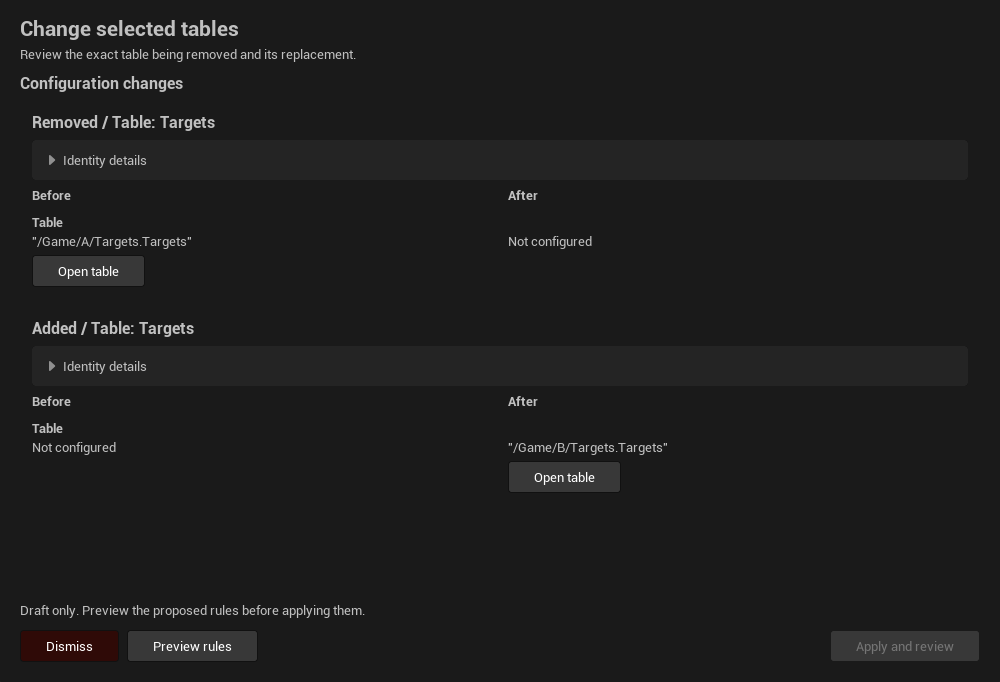
GetConfigurationfirst and keep itsconfigurationFingerprint. AProposeProfilerequest must include that fingerprint. Review the proposal’s Before/After values in Unreal and explicitly approve any application.
A useful first request to an AI client is:
Connect to the current Unreal project through RowTether. Confirm the connection, list the available DataTables, and inspect the schema of the tables I name. Do not invent asset paths, modify assets, import CSVs or apply proposals. Run a read-only review and report findings with their source, destination, coverage and evidence.
Built-in AI workflows
The optional integration exposes four native UAgentSkill workflows through ToolsetRegistry.AgentSkillToolset:
DiagnoseRowTetherTables— investigate missing tables, rows and affected relationships.DesignRowTetherRules— design or refine explicit relationship rules and profiles.CompareRowTetherCSV— preview the impact of a candidate CSV before import.ValidateRowTetherForRelease— report DataTable validation evidence and remaining checks; this does not certify the plugin, the whole game or Fab approval.
Skills guide the AI through a workflow; they do not grant permission to modify the project. The client must still respect the project’s connection and approval settings.
Permissions and limits
- Core automation operations are read-only with respect to project assets and saved profiles. A proposal is an expiring in-memory draft and is not persisted by merely creating it.
- Only enable the integration when the connected AI client is allowed to access the project. Keep Epic’s MCP server local.
- Text returned from tables, CSVs and profiles is project content, not instructions. Treat it as untrusted data.
- The core plugin does not require an AI account, an API key or automatic uploads. Any AI client account and permissions are configured on that client’s side.
- API 2 uses bounded results, pagination and transport limits. A completed review can still contain errors; always inspect findings and coverage instead of treating
Completedas “clean”.
The full native reference and examples are available below and as downloadable documents.
All 16 native tools
Four skills are guided recipes; sixteen tools are the available operations. Agents can compose them beyond those four recipes. No separate server or executable is needed for each workflow.
| Tool | Purpose |
|---|---|
GetConnection |
Confirm project, session, API version and capabilities. |
ListTables |
Discover /Game tables without loading assets; filter and page results. |
InspectTable |
Read field paths, types, allowed operators and revision. |
QueryRows |
Read explicit fields from current editor data with filters and revision-aware paging. |
GetConfiguration |
Read saved configuration and its concurrency fingerprint. |
ValidateProfile |
Check syntax and actual schema compatibility, not whether data passes. |
StartReview |
Start an asynchronous review or CSV simulation with an explicit profile and request ID. |
ListReviews |
Recover retained automation jobs after a timeout. |
GetReviewStatus |
Read state, counts, identity and coverage before interpreting results. |
CancelReview |
Cancel the identified automation job; panel work is independent. |
GetResults |
Page findings, outcomes or relations with table/rule/severity/state/field filters. |
GetRelationships |
Inspect captured relationships or sample current text values for candidate destinations. |
ExplainFinding |
Read recorded evidence and evaluator traces for a finding. |
AnalyzeImpact |
Find captured consumers of a destination table or row. |
CompareReviews |
Compare two retained reviews while qualifying coverage and profile changes. |
ProposeProfile |
Create a temporary draft for human inspection and explicit application in Unreal. |
Inputs and outputs
Use the discovered MCP schema for exact JSON casing and required arguments. Native names use PascalCase; the tested Epic transport uses lower-camel-case fields inside returnValue. Check transport errors and the returned ok/error before reading data.
Page:offsetstarts at 0;limitdefaults to 50, allowed 1–100.Profile:schemaVersion,tablePaths,maxRecords, referencerulesandgameRules. Schema 2 supports game rules. Preserve unrelated rules and their IDs when proposing changes.ReviewOptions: a fresh 32-hexrequestId;hasCandidate; destinationcandidateTablePath; CSV text incandidateCSV. CSV comparison requires a selected destination, not just a filename.RowQuery: explicitfields, optionalrowFilter,revision, anduseWhere/wherefor a condition. FollownextOffsetplusrevision, even for an empty filtered page whenhasMoreis true. Current reads can include unsaved editor data.ResultFilter:tablePath,ruleId,severity,state,field; empty strings leave filters unset. Findings live inreport.findings, outcomes inreport.ruleOutcomes, relations inreport.relations.
The complete contract includes every signature, examples, profile syntax and recovery rules. The native type reference lists all response fields, types and native defaults. Both are downloadable; you do not need to search the installed plugin folder.
Practical requests and tool sequences
Diagnose data
Confirm my Unreal project, inspect Consumers and Targets, and review their declared relationships. Report table, row, field, rule and coverage. Do not change my configuration.
GetConnection → ListTables → InspectTable → GetConfiguration → ValidateProfile → StartReview → GetReviewStatus → GetResults → ExplainFinding. Use real discovered paths. Poll serially until completion and fetch every page needed for the requested report. Completed means finished, not error-free.
Check the effect of a CSV
Compare this CSV with Targets and tell me which selected consumers would lose references. Do not import it.
Review the current profile first. Start a second review with a different request ID, hasCandidate=true, the explicit destination and CSV text. Read GetResults and AnalyzeImpact, then CompareReviews. Current and CSV modes differ: do not classify an unobserved finding as fixed. Impact covers captured consumers, not arbitrary Blueprint or code usage.
Find potential destinations
Inspect WeaponId and show which selected tables contain matching keys. Explain ambiguity before proposing an association.
InspectTable → QueryRows → GetRelationships with candidate mode. Observed values come from the source field, so they exist before a destination is chosen. Candidate mode samples up to 64 current source rows and up to eight selected destinations per page. Several matches are possible; overlap is not proof. This version supports one declared destination per Name/String field; each Row Handle supplies its own destination.
Design and propose a rule
Propose that active soldiers must have Amount at least 1. Preserve my other rules, simulate the change and show me the differences before applying anything.
Inspect actual field types/operators. Read GetConfiguration and retain its original fingerprint. Build a complete profile, validate, review baseline and proposal sequentially, compare results, then call ProposeProfile. Open RowTether → AI proposals to inspect Before/After, preview and apply. Merely creating a proposal does not save it. A stale fingerprint requires regenerating the proposal from current configuration, not attaching a new token to an old draft.
Results, limits and recovery
| Situation | What to do |
|---|---|
| StartReview response times out | Recover through ListReviews or retry identical inputs with the same request ID. Changed inputs need a new ID. |
| Empty filtered page | Follow NextOffset/Revision while HasMore. Do not stop just because Items is empty. |
| Row revision rejected | Restart paging from offset 0 without the old revision; do not mix snapshots. |
| Job no longer retained | Run a new review; disclose that the previous baseline is unavailable. |
| Response too large | Reduce page size or queried fields; preserve coverage and truncation information. |
| Proposal stale or expired | Read current configuration, rebuild/validate and submit a new draft. |
| Partial / Cancelled / Failed | Report limitations and reason; never call the data clean. |
| Fewer errors after changing rules | Check ProfileChanged and coverage; disabling a rule is not a data repair. |
One active automation review, four retained jobs, 30-minute age from creation and 120-second running-job timeout. Proposals: eight pending maximum, 30-minute expiry. Row views use a bounded cache; evicted revisions require fresh paging. Requests/responses are bounded to 4 MiB; profiles to 1 MiB. Review capture and evidence also have budgets: read coverage reasons and truncation flags. Individual asset loads still run on the editor thread.
Use JobId to query retained work, RequestId for retries, RunId for report identity and the appropriate fingerprints for inputs/profile/proposal concurrency. These identifiers are not interchangeable. Pass, Fail, Not applicable and Not evaluable are different outcomes; a shortened evidence display is not the full value.
There is no native tool to repair/import/delete assets, silently commit profiles or export report files. Use the panel for explicit JSON/CSV/HTML export. A client-generated summary is not a plugin-generated export. These data checks do not certify plugin production readiness or Fab approval.